
1win Download for Android and iPhone: APK File, Safari Install and Phone Requirements
The 1win download is free on any phone, and both routes start on the brand’s official site. Android takes an APK file that you install by hand. iPhone needs no file at all: a Safari shortcut puts the app on your home screen, since the Malaysian App Store does not list it. Either way, you sign in to the same account and balance as on the website.
- File
- 1win.apk, 62 MB
- Version
- 2.19.0
- Needs
- Android 10 or newer
- Where
- Official site, Free Money, Install on Android
- Install reward
- 200 Points
- Where
- Safari, not the App Store
- Steps
- Share, Add to Home Screen, Add
- File to download
- None
- Install reward
- 200 Points
1win Download Options: Android APK, iPhone Shortcut or Windows
The app comes in three forms you can install, and the device decides which one you need: an APK for Android, a home-screen shortcut for iPhone and iPad, and a desktop program for Windows. All three start on the official site.
| Option | Where to get it | What you get |
|---|---|---|
| Android APK | Official site: Free Money, Install on Android | An installed app with its own icon |
| iPhone and iPad | Safari: Share, Add to Home Screen | A home-screen icon that opens the site |
| Windows | “1win for Windows” link on the official site | A desktop program |
| Mobile site | Any browser, nothing to install | The same account, games and cashier |
Source: the website, checked 17 and 25 November 2026.
A mobile site needs no 1win download and works in any browser. The installed app adds an icon one tap away and 200 Points for the install itself.
1win APK for Android: Where to Get It and How to Install It
The APK comes from the Free Money section of the official site, where the Install on Android button downloads the file. Android then asks once for permission to install it, and that permission is worth switching off again when the install is done.
Where to Get the Original File
The original file has one source: the official site. Open Free Money and tap Install on Android; the next button is Download the app. The download buttons on this page lead to that same site rather than to a copy of the file, so what reaches your phone is the brand’s own file.
Copies on APK portals and Telegram channels cannot be traced to the brand, even when the file carries the same name.
How to Install the 1win APK Step by Step
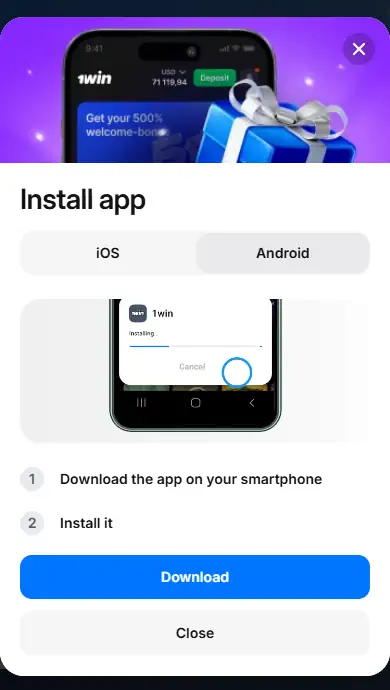
- Open the official site in Chrome and go to Free Money. Tap Install on Android, then Download the app.
- If Chrome warns that the file may be harmful, tap Download anyway. Android shows this warning for every APK from outside Google Play.
- Open the file from the notification or from the Downloads folder.
- When Android asks whether Chrome may install unknown apps, allow it for Chrome only.
- Tap Install and open the app to log in or register.
Choose the account currency with care at sign-up, because it cannot be changed later. MYR is the currency that works with local methods such as FPX and DuitNow.
Switch “Install Unknown Apps” Off Again
Android keeps the install permission for Chrome until you take it back, so switch it off as soon as the app is on the phone. The switch is in Settings under Apps, then Chrome: turn off Install unknown apps; on some phones the switch sits under Special app access. The app keeps working, and the next APK link that opens in Chrome has to ask you first.
Android Requirements: File Size, Version and Permissions
The current version needs Android 10 or newer. On an older phone the file downloads but will not install.
| Item | Value |
|---|---|
| File name | 1win.apk |
| File size | 62 MB |
| Version | 2.19.0 |
| Minimum Android version | Android 10 |
| Package name | tech.onewin.mobile |
| Permissions it asks for | Notifications, camera, microphone, fingerprint, installing its own updates |
| Interface languages | 33, including English and Bahasa Melayu |
Source: the APK file from the official site, 25 November 2026; languages: the website, 17 November 2026.
Check the permissions row before installing anything that claims to be the app. A file that also asks to read your SMS or use Accessibility is a different program.
How the App Updates on Android
New versions arrive through the app itself rather than through Google Play, because the file carries Android’s permission to install its own updates. If an update fails, delete the app and download the file from the site again. Your account and balance are stored on the brand’s side, not on the phone.
1win iOS App: How to Add It to an iPhone Home Screen
The 1win iOS version is a Safari shortcut: the official install window for iPhone sends you to Safari’s Add to Home Screen, and the icon then opens the site in one tap. There is no file to download and nothing to approve in Settings.
Is There an App Store Version in Malaysia?
No. The Malaysian App Store has no 1win app. For an iPhone in Malaysia, the Safari route below is the official one.
How to Add the Shortcut on iPhone or iPad
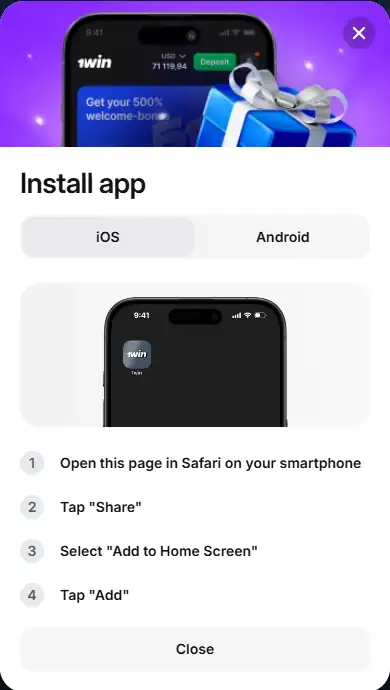
- Open the official site in Safari, the browser the official instructions use.
- Tap the Share icon.
- Scroll down and tap Add to Home Screen.
- Keep the name “1win” and tap Add in the top right corner.
What Changes With the Shortcut on the Home Screen
The shortcut loads the current website every time, so it never needs an update and there is no file on the phone. A “1win” configuration profile or a paid iOS download is not part of the official iPhone route.
1win Casino App or Mobile Site: What You Gain by Installing
The installed app and the mobile site share one account and one catalogue, and installing adds no games of its own. Sports betting sits in the same app as the casino; only poker has a separate app.
| Installed app | Mobile site | |
|---|---|---|
| Install reward | 200 Points | None |
| Space on the phone | Android: 62 MB; iPhone: no file | None |
| Updates | Android: through the app; iPhone: always current | Always current |
| Slots | Same catalogue as the site | 11,155 |
| Live casino tables | Same catalogue as the site | About 1,110 |
Source: the website and its Free Money section, 17 and 25 November 2026.
If you play once a month, the browser is enough and the 1win download can wait. The icon suits people who open the site every evening.
200 Points for Installing the App
Installing the app on Android or iPhone earns 200 Points, the loyalty currency that the brand later exchanges for money. The install task sits in the Free Money section with three smaller ones.
| Free Money task | Points |
|---|---|
| Install the app (Android or iOS) | 200 |
| Confirm the email address | 100 |
| Confirm the phone number | 100 |
| Allow push notifications | 100 |
| Exchange rate | 1,200 Points = RM35 |
Source: the Free Money section, 17 November 2026.
The install reward is worth about RM5.83. The exchange opens only after the first deposit, and the money from it has to be bet once before you can withdraw it. Check the install task in Free Money after installing, and treat the Points as a small extra; the full list of offers is on the 1win bonus page.
1win Download Not Installing: Common Errors and Fixes
An install that will not finish usually fails for one of four reasons: an old copy of the app, Android older than version 10, a blocked install permission or, on iPhone, the wrong browser.
| What you see | Likely cause | Fix |
|---|---|---|
| “App not installed” | An older version of the app, or a copy from another source, is already on the phone | Delete it, then install the file from the website |
| “There was a problem parsing the package” | Android older than 10, or the download stopped halfway | Check the Android version in Settings, About phone; download the file again on Wi-Fi |
| Nothing happens after tapping the file | Chrome is not allowed to install unknown apps | Allow it for Chrome, install, then switch it off |
| No Add to Home Screen on iPhone | Steps followed outside Safari | Open the website in Safari |
While the app refuses to install, the mobile site is a way in to the same account.
How to Spot a Fake 1win APK
A genuine 1win download is a single APK file from the official site, and it costs nothing; a file that fails either test is someone else’s.
- It comes from somewhere other than the official site. APK portals and Telegram channels can offer a file with the same name, and none of them shows where it came from.
- It costs money. The original is free, so a “VIP” or “premium” version for a fee is a warning sign.
- It promises to predict games. Files sold as an “Aviator predictor” or a “Mines hack” have nothing to do with the brand, and no program can know the result of a round before it is played.
- It wants more than the original. The genuine file’s permissions are listed in the requirements table above. A request for SMS or Accessibility access means a different program.
If a doubtful file is already on the phone, delete it and change your account password from another device.
Is the 1win App Legal in Malaysia?
Most online betting and casino brands available in Malaysia, 1win included, operate under offshore licences and hold no Malaysian licence. No local regulator supervises them, so if a withdrawal is held or an account is closed, there is no local authority to complain to. Please be careful and follow the laws that apply where you live. For Muslims, state Syariah laws in Malaysia prohibit gambling of any kind.
1win App FAQ
Yes. The brand charges nothing for the Android APK or the iPhone shortcut, so a site that asks for money is not selling the original file.
The file from the official site is real: it is called 1win.apk and installs as tech.onewin.mobile. Copies from APK portals and chats cannot be traced back to the brand.
Android 10 or newer. The current version does not install on older versions of Android, even though the file downloads.
Open the website in Safari, tap Share, choose Add to Home Screen and tap Add. The new icon then opens the site in one tap.
Android shows that warning for every APK from outside Google Play. Check that the file is 1win.apk from the official site, then allow the install for Chrome only.
Yes. The app, the iPhone shortcut and the website use the same login and balance, so nothing needs to move between them.
No. Deleting the app removes it from the phone only. The account and its balance stay intact and return at the next login.
Gambling should stay a paid pastime. Decide on a limit before opening the app, not during a session. If betting stops being a choice, see the Responsible Gaming guide or call Befrienders KL on 03-7627 2929, 24 hours a day, free and confidential.
By the 1winmalaysia.casino editorial team.
Updated: